JavaScript Language
How JS, HTML & CSS fit together?
- Content Layer
- .html files
- this is where the content of the page lives. The HTML gives the page structure and adds semantics.
- Presentation Layer
- .css files
- the CSS enchances the HTML page with rules that state how the HTML content is presented on the page.
- Behavior Layer
- .js files
- this is where we can change how the page behaves, adding interactivity.
Linking JavaScript code to HTML page
<script src = "path to the script"></script>
The HTML <script> element is used to load JS file into the page. It has an attribute src. whose value is the path to the script you created.
This tells the browser to find and load the script file (just like the src attribute on an <img> tag)
Basic JavaScript Instructions
What is variable?
A script will have to temporarily store the bits of information it needs to do its job. It can store this data in variables.
You can compare variables to short-term memory, because once you leave the page, the browser will forget any information it holds.
A variable is a good name for this concept because the data stored in a variable can change (or vary) each time a scripts runs.
How to declare? How to assign?
- Declaration
- var, let, const - variable keywords.
var price;
let username;
const password;
- var, let, const - variable keywords.
- Shorthand declaration of multiple variables
let price, username, password; - Assignment
name = 'Bob';
password = 35432;
username = 'Bob_12';
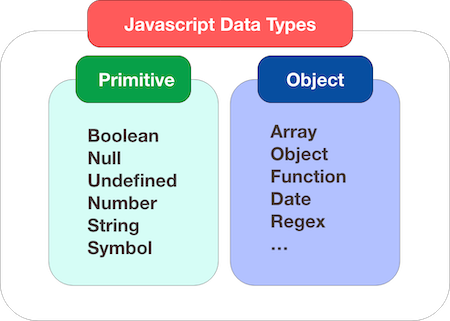
Data Types
- Numeric Data Type
- String Data Type
- Boolean Data Type
- Arrays
- Objects
- …
Rules for Naming Variables
- The name must begin with a letter, dollar sign($), or underscore(_). It must not start with a number.
- The name can contain letters, numbers, dollar sign ($), or an underscore (_). Note that you must not use a dash (-) or a period(.) in a variable name.
- You cannot use keywords or reserved words. Keywords are special words that tell the interpreter to do something. For example, var is a keyword used to declare a variable. Reserved words are ones that may be used in a future version of JavaScript.
- All variables are case sensitive, so score and Score would be different variables name. But its bad practice to create two variables that have the same name using different cases.
- Use a name that describes the kind of information that the variables stores. For example firstName or lastName.
- If your variable name is made up of more than one word, use a capital letter for the first letter of every word after the first word. You can also use underscore.